Fuel8

For coaches

Coach from what your clients actually logged.

Every meal, weigh-in, night’s sleep, glass of water, step count and workout a client chooses to share, on one screen, with the same numbers they see in the app. And a way to send a workout back.

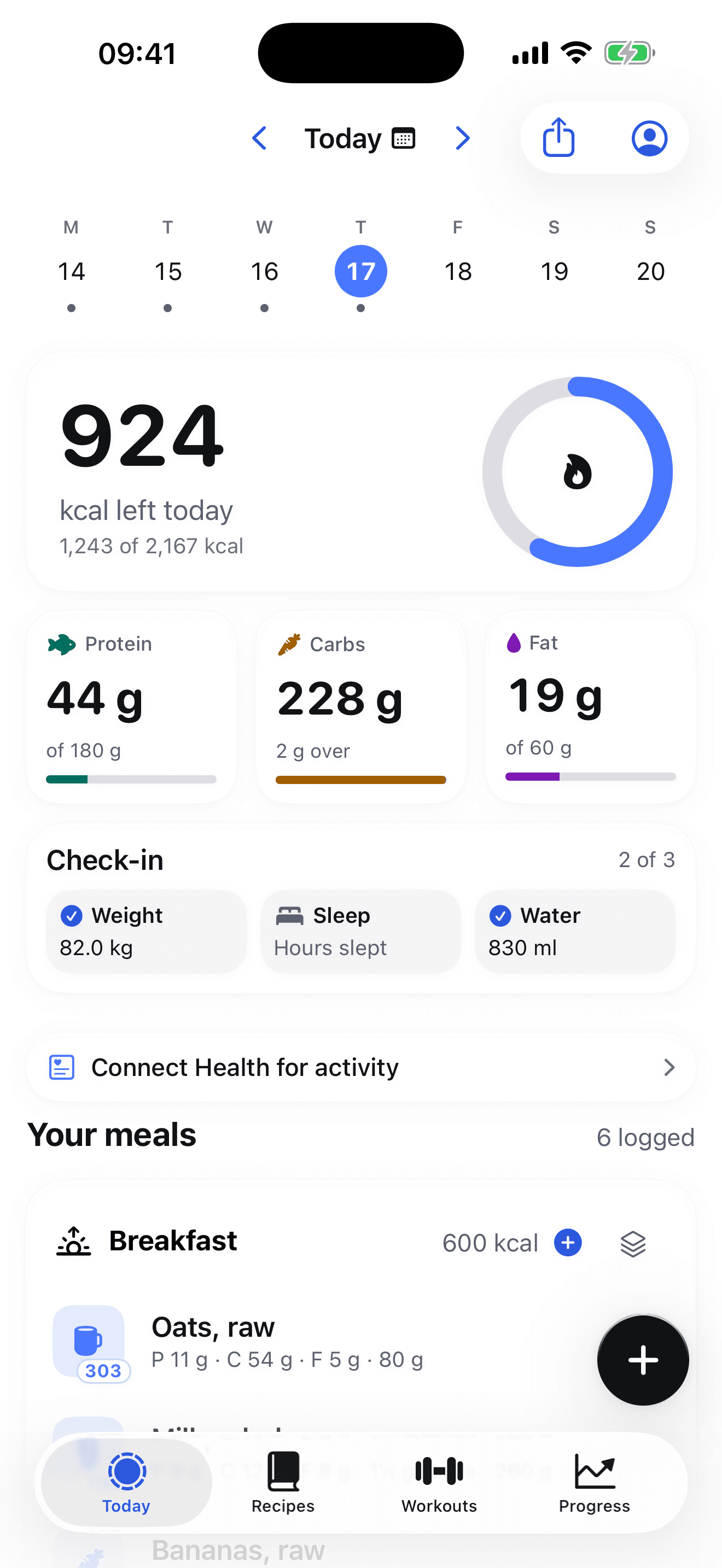
The Today screen with the morning check-in: weight 82.0 kg, hours slept, 830 ml of water, above the day's meals.

What you see of a client.

Three views per client: Progress, Diary and Workouts. They are the same views the client has of themselves on this site, so nobody is looking at a different set of numbers.

Every meal, item by item

Each food with its grams, calories, protein, carbs and fat, under the meal and the time it was logged. Beside each one: how it was logged, whether search, barcode, quick add, Say it, a photo estimate or a repeat, and a flag when the figure is an estimate.
Water

Each entry in millilitres with its time, and the day's total.

Sleep

Hours slept, from the morning check-in on the Today screen.

Weight

Every weigh-in, and the same seven-day weighted average the app draws, under the same rules: no trend line under three days, no rate under four days across two weeks.

Steps and active energy

Daily, from Apple Health, if the client turns that on as a separate switch. A day with no reading shows as missing, never as zero.

Full workouts

Every session with each exercise, its sets, reps and weight, and the volume lifted. Cardio with distance and duration.

The targets in force

The calorie and macro targets that applied on each day, so a change of target does not rewrite the history behind it.

The morning check, on one screen.

One row per client. Search by name or label, or filter to the clients with no shared records, no upload in seven days, or a workout still waiting to be accepted.

The list describes records received, not effort. No upload can mean sharing is off, the phone was offline, or nothing changed. The page says so under the filters, and so does this one.

Last logged
The most recent day with anything in it. Three days without one and the row is marked quiet.
Days, 7
How many of the last seven days have a log.
kcal, 7-day
Average calories a day across the logged days, next to the target.
Weight
The latest weigh-in and its date.
Workouts, 7
Sessions completed in the last seven days.
Steps and active kcal
Averages over the days with a reading, and how many days that was.
Last upload
When the app last sent anything, so you know how old the numbers are.
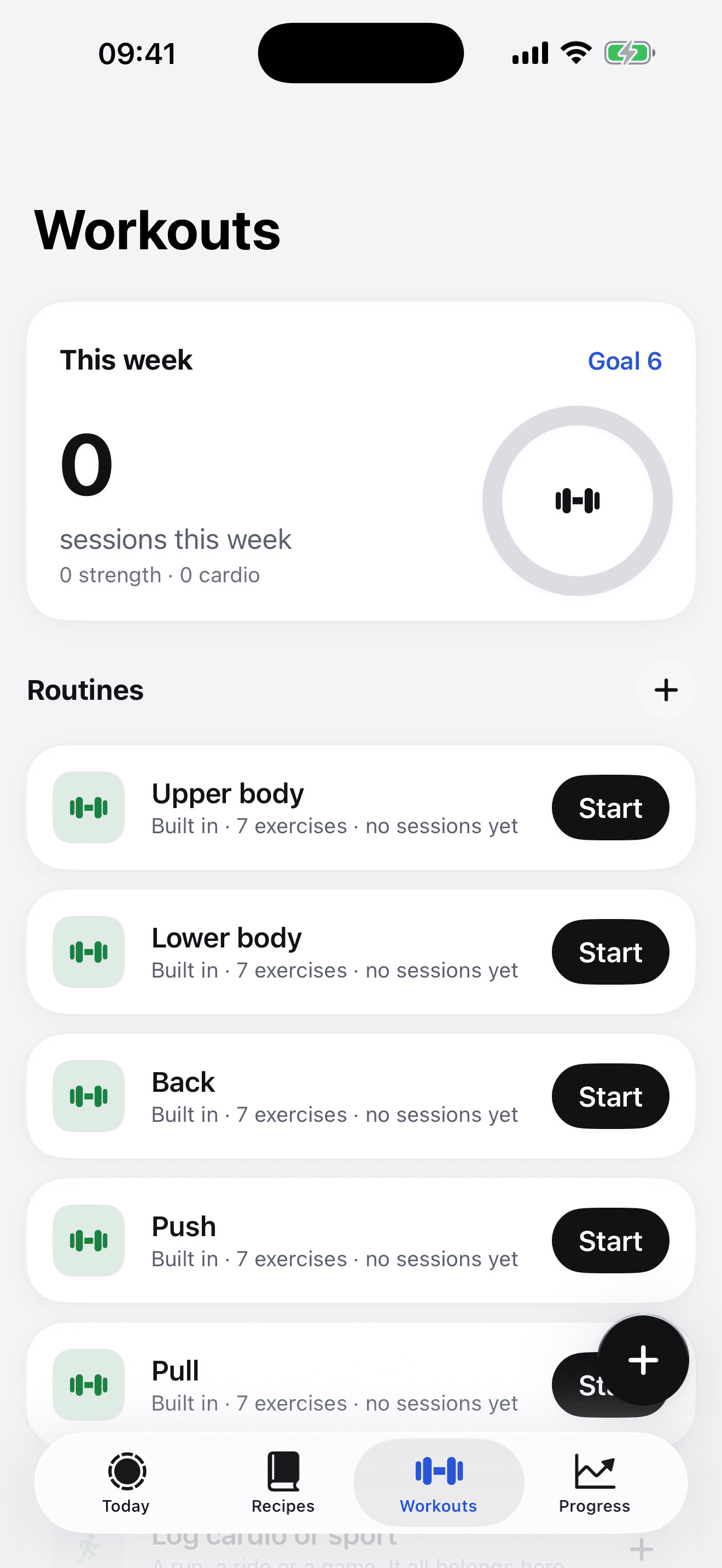
The Workouts tab: this week's sessions against a goal of six, and the built-in routines Upper body, Lower body, Back, Push and Pull, each with seven exercises.

Send a workout back.

Start from one of the app’s built-in routines, or from what the client’s gym actually has.

  • A built-in routine. Upper body, Lower body, Back, Push, Pull. The same ones the app ships with, so the client already knows them.

  • Generated from the equipment. Tick the machines and stations the gym has, from a catalogue of 100 types and 142 exercises, and preview a session built only from those. Set the planned sets per exercise, and add a note.

  • You confirm before it goes. The send button asks you to state that you have checked the exercises, the equipment and their suitability for this client. It is stored as a fixed snapshot, so what they received is what you reviewed.

  • They decide. It lands in the app’s inbox. The client adds it to their routines or dismisses it, and you see which. Sessions they complete come back through sync, with every set.

Getting set up.

  1. 01

    Ask

    Coaching is switched on per account by the Fuel8 team. Write to us with the name you sign in with, and it is turned on for you.

  2. 02

    Invite

    Sign in here and open Clients. Make an invite code and give it to the client, with a label so you know who it was for.

  3. 03

    They accept

    The client signs in on their iPhone, opens Account, Sync & Coaching, and enters your code under Connect with a coach. They choose whether to turn on sync. You see the records they send.

To coach on Fuel8, email marketing@letsgrowmore.com.

Say which Apple Account you sign in with. Coaching is switched on for that account by hand, and there is no form for it yet.

Your clients need the app. You need a browser.

The client logs on their iPhone. You read it, and send workouts back, from any browser at getfuel8.com.

The Fuel8 app icon

Fuel8

Calorie & macro tracker

iPhone · iOS 26.0 or later