
iPhone App Workflows & Features
Track Calories and Macros With Workouts | Fuel8
Training progress doesn't move in a straight line. Fuel8 logs meals and workouts on your iPhone, then lets you compare nutrition data against performance history to spot patterns worth investigating.
Fuel8 Editorial
14 October 2026
Updated 14 October 2026

Training progress doesn't move in a straight line. It slows, stalls, or dips backward for reasons that aren't immediately clear. Stress, poor sleep, illness, or subtle shifts in nutrition and effort all contribute. Fuel8 on iPhone logs meals via barcode scan, voice input, or database search, then lets you compare that nutrition data against your workout history to spot patterns worth investigating. The app records calories and macros in one log, stores everything on your device, and gives you tools to review what happened. But Fuel8 can help identify associations and gaps in your records, not diagnose why progress stalled. That requires context beyond the numbers.
Quick answer: Using Fuel8 to review nutrition and workout data
Training plateaus typically have multiple causes. Fuel8 records help spot correlations between nutrition and performance. Correlation isn't diagnosis. The app's offline database of 13,521 foods, barcode scanner, and voice logging make it fast to capture what you ate. Once logged, you can compare calorie and macro totals against your targets (which you can edit anytime) and cross-reference them with your workout records over the same period.
Look for patterns. Note what stands out. Correct incomplete entries to strengthen your data.
Nutrition values are estimates. Fuel8's offline database helps reduce guesswork, but exact figures aren't guaranteed. For a broader look at how Fuel8 stacks up against MyFitnessPal, that piece covers what each tool prioritizes.
What you need first
Before reviewing your nutrition and workout data in Fuel8, confirm you have:
Complete food logs. A day logged roughly beats a day not logged at all. Fuel8 supports rough logging. Check that all meals, snacks, and drinks over the period you're reviewing are recorded. Even partial entries count.
Fuel8 targets set. The app provides daily calorie targets that you can edit to match your current goals. Targets can also include macro thresholds in grams for protein, carbohydrates, and fat.
Workout records in Fuel8. Your exercise history (sets, reps, weight moved, or cardio duration) should be logged in the same app so you can spot concurrent patterns with nutrition.
A timeframe to review. Start with 1-2 weeks of data. Long enough to reveal trends but short enough to stay actionable. Weekly trends matter more than daily swings.
Your phone handy. Fuel8 stores all data locally on your iPhone, so you can review anytime without syncing or accounts.
Step-by-step: Six steps to review nutrition alongside workout data
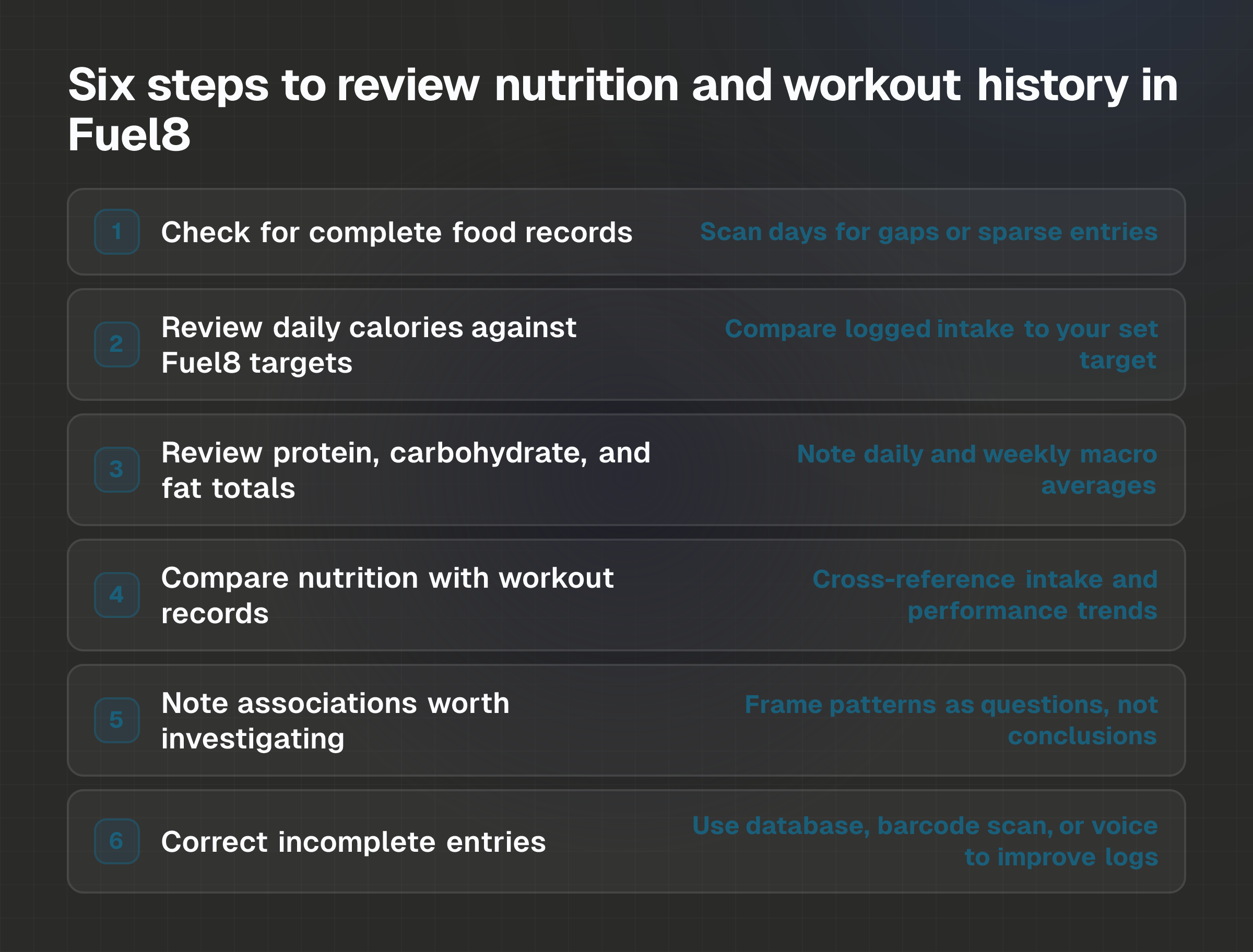
Step 1: Check for complete food records
Open Fuel8 and scan through the days in your review period. Look for entries that feel sparse or gaps where meals are missing entirely.
Identify any full days with no log. Or days where only breakfast and dinner appear but lunch is blank. Note days where entries lack description (e.g., "salad" with no portion detail) or seem unusually low in calories. Don't discard partial records. They're still signal.
If you find gaps, decide whether to leave them or fill them in. Fuel8 lets you log to a past day, so you can add missing details if you remember them.
Step 2: Review daily calories against Fuel8 targets
Pull up your logged calories for each day in your review window and compare them to your Fuel8 target (e.g., 2,000 per day).
Check how often you hit, exceeded, or fell short of your target. Look for patterns: Do you undershoot on weekdays and overshoot on weekends? Are you consistently above or below?
Note any days with significant swings (e.g., 1,500 calories one day, 2,800 the next). Fuel8 combines calories and macros in one log, so you see both in the same view. If your target no longer matches your current goal, edit it. The app is flexible. Targets exist to guide, not constrain.
For a deeper look at how intake and expenditure actually interact, see Calories eaten versus calories burnt.
Step 3: Review protein, carbohydrate, and fat totals
Examine your logged macronutrient totals without assigning personal targets to yourself. Fuel8 tracks protein, carbohydrates, and fat in grams alongside calories.
Note your daily and weekly averages for each macro. Look for significant deviations from your typical pattern (e.g., a day with half your usual protein, or a spike in carbs). Observe whether macros cluster around certain days (e.g., higher carbs on workout days, lower protein on rest days).
Do not conclude what your personal protein or carbohydrate needs should be. This review is observational. You're documenting what actually went in, not prescribing what should.
Step 4: Compare logged nutrition with workout records over the same period
Cross-reference your nutrition logs with your Fuel8 workout history. Look for concurrent trends.
Identify periods of strong performance (PRs, higher rep counts, better endurance) and note the nutrition from those days. Identify periods of fatigue, lower performance, or slower recovery, and examine the nutrition data alongside. Mark days with significant calorie or macro changes and see whether workout quality shifted around those dates.
You might notice that energy dipped on days with consistently lower carbohydrate intake. Or that strength sessions felt stronger when protein intake was higher. These are worth documenting. They aren't proof.
Step 5: Note associations worth investigating
After comparing nutrition and workout data, list the patterns you observe. Frame them as questions, not conclusions.
"Lifting felt harder on days when carbs dropped below 200g." Or: "Fatigue increased when calories dropped below 1,800." Or: "Recovery felt slower on lower-protein days."
These are associations you've spotted, not proven causes. Associations point to areas worth exploring further (perhaps through adjusting one variable and observing the outcome), but they don't prove cause and effect. Many factors influence performance: sleep, stress, hydration, and prior training all matter.
Step 6: Correct incomplete entries
Return to any gaps or rough logs you identified in Step 1. Improve them using Fuel8's logging features.
Use the database search to upgrade vague entries (e.g., "salad" → "Caesar salad, 2 cups"). Scan barcodes on packaged foods to pull in accurate nutrition data. Use voice input to add details quickly (e.g., "chicken breast, 150 grams, grilled"). Log to a past day if details come back to you later. If you're logging something unconventional like meals from food trucks, the same principles apply: rough is better than nothing.
Stronger data makes future reviews more reliable.
Example or scenario: A week of nutrition and workout review
A trainee logs workouts and meals in Fuel8 over one week and notices the following:
Monday, Wednesday: Calories average 1,950 per day. Protein runs 120-140g. Carbs average 180g. Workouts feel solid; squats and deadlifts hit expected targets.
Thursday: Calories drop to 1,650. Protein falls to 95g. Carbs hit 130g. The same workout feels noticeably harder. By the final set, rep count drops by 2-3.
Friday: Calories recover to 2,100. Protein bounces to 155g. Carbs spike to 260g. Workout feels strong again.
The trainee notes the association: "Performance dipped on Thursday when calories and protein were lower." That's a legitimate observation. But it doesn't prove that Thursday's lower intake caused Friday's better performance, nor does it mean that eating more always guarantees stronger workouts.
Sleep on Thursday night, prior training stress, or hydration could all have played a role. The pattern is worth tracking. The trainee might experiment, logging similar data over subsequent weeks to see whether the trend holds. That's the point of Fuel8's data: to surface questions, not answer them definitively.
Common mistakes: What derails nutrition and workout analysis
Over-interpreting associations as causes. Spotting that strength improved on higher-calorie days doesn't mean calories alone drive performance. Stress, sleep, prior fatigue, and other variables are in play. Fuel8 data shows correlation, not causation.
Chasing perfect accuracy at the cost of consistency. A day logged badly is still useful. Resist the urge to demand perfection. Research on how long the average diet lasts points to burnout as a major factor in abandoned efforts, often due to rigid logging.
Focusing on daily fluctuations instead of trends. A single day of lower calories or missed protein doesn't define your week. Weigh daily. Believe the weekly average. applies to nutrition just as it does to weight. Similarly, one low-energy workout doesn't prove your nutrition strategy is broken. Look for patterns across 5-7 days before drawing conclusions.
Ignoring non-nutrition factors. Performance also depends on sleep, stress, hydration, prior training volume, and how long it's been since your last meal. Fuel8 lets you log detailed health metrics, so use that context. A dip in energy might reflect a poor night's sleep, not low carbs.
Trying to "make up for it tomorrow." If you exceed your calorie target one day, eating less the next day doesn't correct the imbalance. You can go out on Friday. You just can't plan to fix it on Saturday. Track the week as a whole, not day-to-day.
Relying on calorie counts without skepticism. Restaurant meals are often underestimated by around 175 calories on average, and the error grows with larger portions. Meals labeled as "healthy" tend to be underestimated by 20% compared to indulgent meals of the same size. Fuel8's offline database reduces guesswork, but estimates vary. One analysis of photo-based logging versus weighed portions found a single breakfast might read as 600 calories one way, 425 another way, and 514 when weighed. Log consistently, but hold your estimates lightly.
FAQs
Why should I log if nutrition values are just estimates?
Estimates are still signal. Fuel8's large offline database gets you closer to reality than guessing by eye. Consistent logging reveals your actual patterns over time. A week of rough logging beats a week of perfect accuracy in your head.
The point isn't precision per meal. It's understanding your average intake and how it correlates with performance.
Can Fuel8 tell me if my calories are too high or too low?
No. Fuel8 shows your logged intake against the targets you set, but the app doesn't diagnose whether those targets are right for you. Your calorie needs depend on age, sex, weight, activity level, and individual metabolic factors, things only you and a nutrition professional can evaluate. Research on eating too little to lose weight reveals that many factors beyond calories influence outcomes. Use Fuel8 to track and observe, not to self-diagnose.
How do I know if an association I spot in Fuel8 is real?
You don't. Not from one week of data. Real associations require time and repeated observation. Log for 3-4 weeks and see whether the pattern holds. If you notice that performance improves consistently when protein hits 150g or higher, that's a stronger signal than a single week. But even then, other variables are at play. Fuel8 helps you spot what changed. It can't prove why.
Can I edit my calorie or macro targets in Fuel8?
Yes. Fuel8 targets can be edited anytime to reflect changing goals. Open your target settings and adjust daily calorie goals or macro thresholds in grams. The app is designed to flex with your needs, not lock you into a fixed plan.
What if I logged a meal incorrectly, can I fix it?
Yes. Use Fuel8's database search to look up a more accurate entry, scan a barcode if the food is packaged, or use voice input to add detail. If you're editing a past day, Fuel8 lets you log to any previous date. Stronger entries improve your future analysis.
Should I be concerned if one day of workouts feels weak?
No. Single-day performance fluctuations are normal and rarely due to nutrition alone. Sleep, stress, hydration, and prior training load all matter. Fuel8 data is most useful when reviewed across a week or more. If weakness persists over several days, cross-reference your nutrition and workout logs for patterns, but don't overcorrect after one bad session.
Download Fuel8 on the App Store.
- iPhone App Workflows & Features
- review nutrition and workout data Fuel8
- Fuel8 calorie tracking
- compare macros and workouts
- nutrition and training patterns
Fuel8 is on the App Store.
A food diary for iPhone. It tracks protein, carbs and fat alongside calories, shows a weight trend rather than a daily verdict, never adds exercise calories back, and has no streaks to break.
Download on the App StoreGet the seven-day Fuel8 email guide, including how the app works and membership benefits. Then occasional recipes and product updates.
Your name and email go to Grow More Services L.L.C-FZ, the company that builds Fuel8, and are stored in Resend so we can email you the seven-day app guide, membership benefits, recipes and product updates. An account is not required. Unsubscribe in one click, any time.
This piece is editorial content and not medical or dietary advice. The full health disclaimer is below.