
Which Food Loggers Work Offline on iPhone
Fuel8 is built to log meals, workouts, and progress on your iPhone without requiring an account, internet connection, or cloud syncing.
Fuel8 Editorial
4 November 2026
Updated 4 November 2026

Fuel8 is built to log meals, workouts, and progress on your iPhone without requiring an account, internet connection, or cloud syncing. It stores all data on your device using an offline food database of 13,521 items, with barcode scanning and voice logging that work without Wi-Fi or cellular. Other trackers like MyFitnessPal, Cronometer, Lose It!, and MyNetDiary don't publicly document offline functionality on their front pages, making Fuel8 distinct for users who want to log calories and macros without a network connection. This comparison explains how Fuel8 handles offline logging and what you trade off by choosing it over connected alternatives.
| Feature | Fuel8 | Other Major Trackers* |
|---|---|---|
| Offline logging | Yes; 13,521-item database, barcode (after first lookup), voice | Not documented |
| Account required | No | Typically yes |
| Data stored on device | All logged records | Typically cloud-synced |
| Barcode scanning | Yes, works offline after first use | Yes, requires internet |
| Voice logging | Yes, on-device | Varies; often cloud-based |
| Food database size | 13,521 foods | Not specified publicly |
| Macro tracking | Yes, protein/carbs/fat per meal | Yes |
| Workout logging | Yes, with equipment-aware routines | Yes, varies by app |
| Coach sharing | Optional; user-controlled | Varies; often automatic sync |
| Privacy: no analytics | Confirmed | Not documented |
| Privacy: no third-party code | Confirmed | Not documented |
*MyFitnessPal, Cronometer, Lose It!, MyNetDiary, front pages read 4 November 2026.
Quick verdict: When offline matters
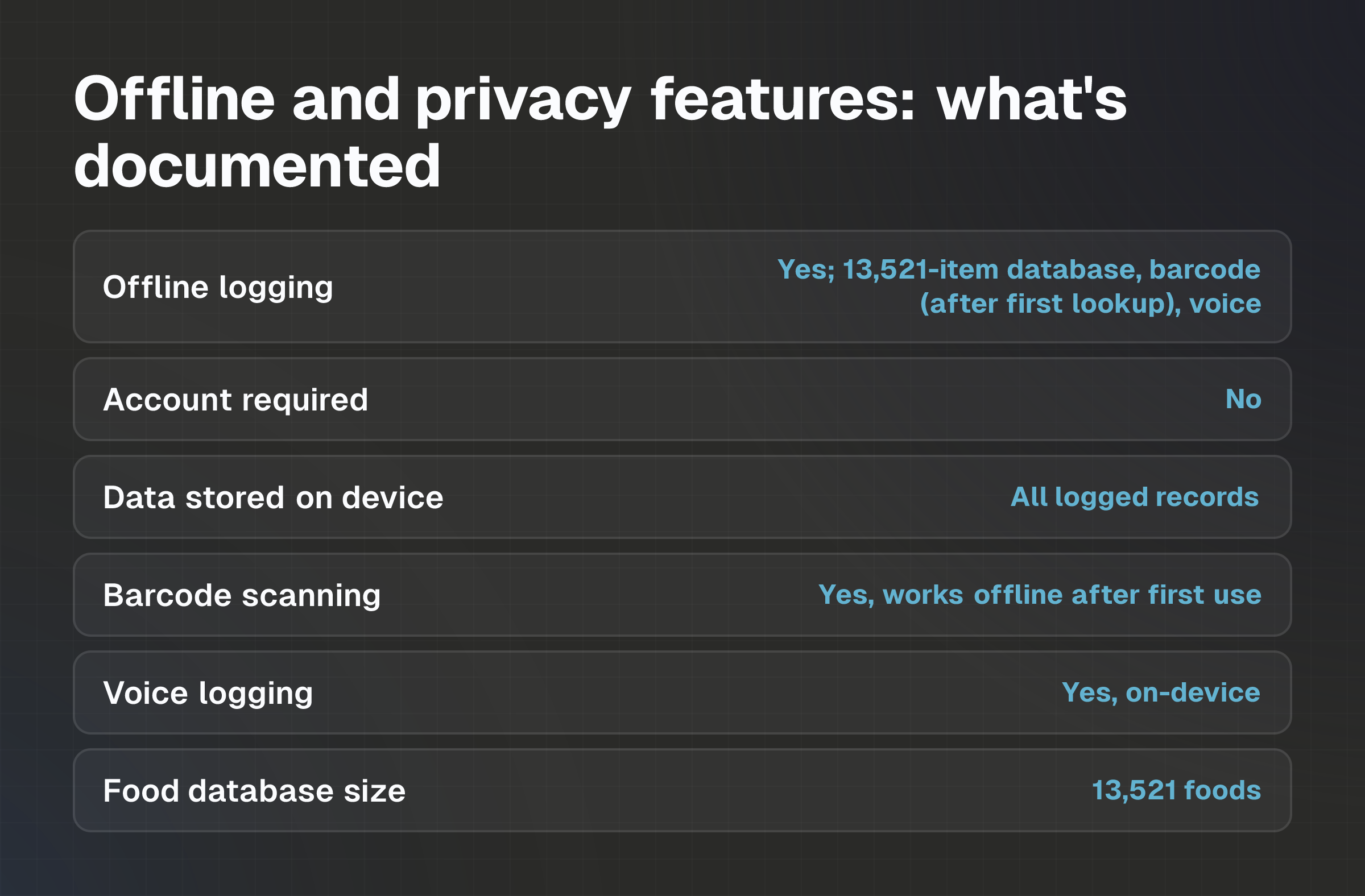
Fuel8 is the only app in this comparison that publicly documents offline food logging without requiring an internet connection or account sign-up. If your primary need is to record meals, macros, and progress while offline and keep that data on your device, Fuel8 fits that priority directly. If you rely on a connected ecosystem, social features, automatic cloud sync, coaching integrations across multiple apps, or device-wide fitness data sharing, you'll need to weigh Fuel8's local-only design against the convenience of cloud-based alternatives.
At a glance: What each app prioritizes
Fuel8: Privacy and offline independence. Fuel8 states it keeps all data on your phone, offers no account or login, and includes barcode scanning and voice logging that work without internet after initial setup. It's built for users who prefer to own their records and share them only when they choose.
MyFitnessPal: Connected tracking at scale. MyFitnessPal describes itself as "the world's #1 nutrition tracking app" and is designed for social sharing, device integrations, and a large community feature set. Requires internet access and typically syncs to the cloud.
Cronometer: Science-backed precision. Cronometer's tagline is "Science-backed nutrition tracking at your fingertips" and is pitched to individuals, dietitians, nutritionists, and health professionals. Doesn't document offline functionality on its front page.
Lose It!: Camera and barcode speed. Lose It! emphasizes barcode scanning and smart camera food logging ("Say It. Snap It. Scan It") and doesn't publicly document offline use.
MyNetDiary: Free calorie counting. MyNetDiary frames itself as "The Best Free Calorie Tracker for Most People" and includes a barcode scanner; offline capability isn't documented on its front page.
How the comparison was made
This article compares Fuel8 against four widely-used nutrition trackers based on publicly available product information from each app's official website and front-page description. The comparison was conducted on 4 November 2026 using each company's current official marketing materials. Fuel8's features and privacy policies are drawn from its official website at getfuel8.com.
Other apps' descriptions reflect the information shown on their front pages on the date of this review; offline functionality claims are absent from those front pages. Where features are documented, they're attributed to the source. Where they're not, it's stated that the information was not found; no inference is made about whether a feature exists or doesn't.
Calorie targets and nutritional values in all trackers are estimates. These tools are general wellness apps, not medical devices, and don't provide medical or nutritional advice.
Food logging and nutrition data
Fuel8's approach: Log a meal by searching the offline database (13,521 foods), scanning a barcode, or speaking a description. Each entry records calories and macros (protein, carbs, fat). Fuel8 doesn't add exercise calories back to your daily target.
The app is built to encourage rough logging. A day logged badly is recorded as more useful than a day not logged at all.
Research shows this matters: photographic estimates alone can miss actual calories by 17% high or low, and AI-based image analysis shows mean absolute percentage errors of 36% for energy, with some models ranging from 64% to 110%. When restaurants provide calorie counts, actual measured values exceed stated counts by an average of 175 calories per meal in studies, and meals framed as "healthy" are underestimated by 20% compared to clearly indulgent meals of the same size.
Competitor approaches: MyFitnessPal, Lose It!, and MyNetDiary all offer barcode scanning and food search. Lose It! and others add smart camera logging. All require internet access to search their food databases and sync records to the cloud. None document an offline food database on their front pages.
The trade-off: Fuel8's offline database is smaller than the cloud-indexed databases of major competitors, but it works without Wi-Fi. If your meals consist mostly of packaged items with barcodes (which work offline after the first scan), Fuel8's database may be sufficient. If you frequently log obscure or restaurant-specific items, a larger cloud database may be more complete.
Workouts, progress and connected features
Fuel8: You can build equipment-aware workouts, log session details, and track progress photos. Coaches can send you personalized routines through the app's coaching connection tools. When a coach reviews your logs on a single dashboard, you control what data you share, nothing is sent unless you choose to enable it.
Weight tracking shows a weekly average rather than a daily verdict, reflecting normal fluctuation from water, glycogen, and transit food.
Research shows daily weight varies significantly, often masking fat loss. Studies found weight rises across weekends and falls during working days; these swings should be treated as normal, not as signs of weight gain.
Competitor approaches: MyFitnessPal, Cronometer, Lose It!, and MyNetDiary all offer workout logging and progress tracking. They integrate with Apple Health, Google Fit, and connected devices. Data syncs automatically to the cloud.
The trade-off here? Fuel8's coaching integration is manual and requires explicit user consent for each data share. Competitors offer automatic sync and broader ecosystem integration, which is faster if you use multiple fitness apps. Fuel8 prioritizes control over convenience.
Offline use, accounts and privacy controls
Fuel8: All logging happens on your device. Fuel8 states that nothing logged leaves your phone unless you explicitly share it. The app requires no account, no login, and no password. Barcode scanning works offline after the first scan. Voice logging is on-device, with no server-side speech recognition.
The app includes no analytics, ad networks, or third-party tracking code. No food diary or health details are shared with the company.
Competitor approaches: MyFitnessPal, Cronometer, Lose It!, and MyNetDiary all require cloud connectivity to log, sync, and search food data. They typically require account creation. Privacy policies vary, but cloud syncing means your data leaves your device. None document the absence of analytics or third-party code on their front pages.
The trade-off: Fuel8 works entirely offline, but you give up automatic syncing across devices and integration with other fitness apps. If you use only one phone and don't need to access your logs from a web browser or tablet, offline-only storage removes a point of data exposure. If you want your fitness data centralized in the cloud or accessible from multiple devices, Fuel8's local-only design is a limitation.
Pricing and feature availability
Fuel8: Fuel8 states that barcode scanning, voice logging, macro targets in grams, and logging to a past day are standard features included during the current open-launch period. A membership plan called Founders Entry is planned at US$3 per month. Pricing and availability can change. The app is available on iPhone.
Competitor approaches: Pricing for MyFitnessPal, Cronometer, Lose It!, and MyNetDiary varies by region, app store, and plan tier. Specific current prices and regional availability were not confirmed in this review. Check each app's official site for current pricing in your market.
The trade-off: Fuel8's current open-launch period includes features that may become premium in the future. Competitors offer tiered free and paid plans. If you prefer a fully free app indefinitely, competitors may offer that option; if you want transparent pricing upfront, verify the current Fuel8 membership structure on getfuel8.com.
Limitations and trade-offs
Fuel8's limitations:
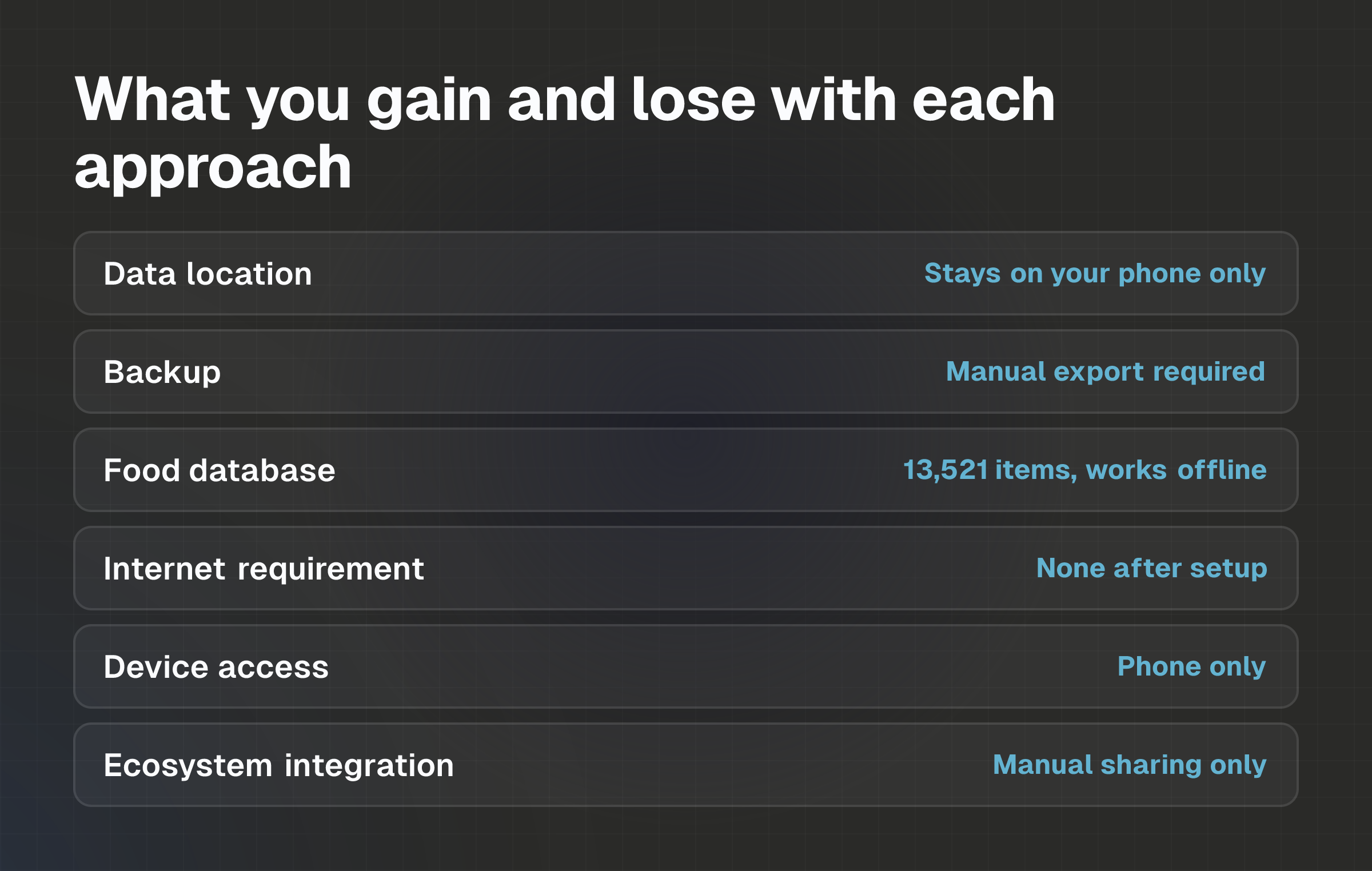
- No automatic cloud sync: Your logs stay on your phone. If you lose or replace your device without exporting data, records don't transfer automatically. You must manually export or share logs if you want them backed up elsewhere.
- Smaller food database: 13,521 items is useful for packaged goods and common meals, but doesn't match the scale of cloud-indexed databases used by competitors.
- No cross-device access: You can't view your logs on a web browser or tablet. Everything is phone-only.
- No app ecosystem integration: Fitness data doesn't sync automatically to Apple Health or other apps. You control what's shared, but you don't get the convenience of automatic ecosystem integration.
Competitor strengths:
- Automatic cloud backup: Logs sync across devices and are backed up to the cloud, reducing the risk of data loss.
- Larger food databases: Cloud-indexed databases include more items, regional restaurant chains, and uncommon foods.
- Cross-device access: Log on your phone, review on the web, see your data everywhere.
- Ecosystem integration: Automatic sync with Apple Health, Garmin, Fitbit, and other connected devices.
Which app fits which priorities
Choose Fuel8 if:
- You want to log meals without an internet connection or Wi-Fi.
- You don't want to create an account or provide passwords.
- You want all your food and workout data to stay on your phone and not sync to the cloud.
- You prefer manual, intentional data sharing with a coach over automatic syncing.
- You value privacy and the absence of analytics, ad networks, and third-party tracking code.
- You don't need to access your logs from a web browser or multiple devices.
- You log mostly packaged items with barcodes or foods in a general database.
Choose a competitor app if:
- You need automatic cloud backup and cross-device access.
- You want to log from your phone, a web browser, and a tablet simultaneously.
- You rely on a large, cloud-indexed food database for restaurant meals and regional items.
- You want automatic integration with Apple Health, Garmin, Fitbit, or other fitness devices.
- You use multiple fitness apps and prefer automatic ecosystem sync.
- You need your logs accessible if you lose or replace your phone.
Evidence, disclosures and last verified
This comparison draws on official product websites, app store listings, and published privacy policies for each application. Fuel8's features are sourced from https://www.getfuel8.com/. Competitor information is drawn from their front pages as of 4 November 2026: https://www.myfitnesspal.com/, https://cronometer.com/, https://www.loseit.com/, and https://www.mynetdiary.com/. Research citations on calorie estimation error, restaurant meal underestimation, and weight fluctuation are drawn from peer-reviewed studies linked in Fuel8's published articles.
Fuel8 states that calorie targets and nutritional values are estimates. Fuel8 is a general wellness tool and doesn't provide medical, dietary, or personalized nutritional advice. No claims in this comparison guarantee weight loss, fat loss, muscle gain, adherence, or health outcomes.
Last verified: November 4, 2026
Disclosure: This comparison is published by Fuel8.
Common questions
How does offline logging work if my food database is smaller?
Offline databases must be stored on your phone, so they're smaller than cloud-indexed databases. Fuel8's 13,521 items covers most packaged foods and common meals. Barcode scanning works offline after the first lookup, the barcode is matched locally. If a food isn't in the database, you can log a similar item or estimate. Rough logging is more useful than no logging at all.
Will my logs sync to the cloud if I turn on Wi-Fi?
No. Fuel8 doesn't sync logs to the cloud by default. Your data stays on your phone. If you want to share logs with a coach, you can enable that intentionally through the coaching connection tools. You control what leaves your device.
Can I share my logs with a coach without sharing everything?
Yes. Fuel8 states that clients control what data they share with their coach. You can share specific logs, progress photos, or metrics through the coaching dashboard without exposing your entire food diary. The coach sees only what you choose to send.
What happens if I lose my phone?
Your logs aren't backed up to the cloud, so they don't automatically transfer to a new phone. You'd need to export your data before switching devices. Cloud-based competitors automatically back up and restore your data if you log in on a new device.
Can I use Fuel8 on a tablet or access my logs on the web?
Fuel8 is iPhone-only and doesn't have a web version. All logging and viewing happens in the app. If you need cross-device access or a web interface, a cloud-based competitor would better fit that need.
How accurate are the calorie and macro estimates in any tracker?
All trackers estimate calories and macros. Research shows photographic estimates can miss actual energy by 17% high or low, AI analysis ranges from 36% to 110% error, and restaurant stated calories are often 175 calories lower than measured values.
Logged data is useful for direction and trend, not as a precise measurement. Treat all estimates as educated guesses and log consistently to track your own pattern.
Next step
Understanding your offline and privacy needs is the first step. If internet-free logging and local data storage are non-negotiable, Fuel8 is worth a closer look. If you need cloud backup, cross-device access, or a larger food database, a connected app may serve you better. Either way, the key to useful logging is consistency, not perfection.
Download Fuel8 on the App Store
- Comparison
- offline food logger iPhone
- offline calorie tracker
- food logging without internet
- iPhone nutrition app offline
Fuel8 is on the App Store.
A food diary for iPhone. It tracks protein, carbs and fat alongside calories, shows a weight trend rather than a daily verdict, never adds exercise calories back, and has no streaks to break.
Download on the App StoreGet the seven-day Fuel8 email guide, including how the app works and membership benefits. Then occasional recipes and product updates.
Your name and email go to Grow More Services L.L.C-FZ, the company that builds Fuel8, and are stored in Resend so we can email you the seven-day app guide, membership benefits, recipes and product updates. An account is not required. Unsubscribe in one click, any time.
This piece is editorial content and not medical or dietary advice. The full health disclaimer is below.